
Getting started
1. Save a plan
In the directory where you run Terraform:
sh
terraform plan -out=tfplan2. Open it
sh
planlens tfplanplanlens converts the plan with terraform show -json, prints a summary and opens the plan in your browser:
text
planlens · tfplan · Terraform 1.16.4
  + 8 to create   ~ 9 to update   -/+ 3 to replace   - 7 to destroy
  also 1 to import, 1 to move, 1 to forget, 1 to read
  ! 5 destructive changes to resources that hold data · 3 destroys look like renames · 3 changes made outside Terraform

  Viewer: http://127.0.0.1:63548/af0749d2111a923f09d6fce678efcdf0/
  Served only to this computer. Press Ctrl+C to stop.
3. Review
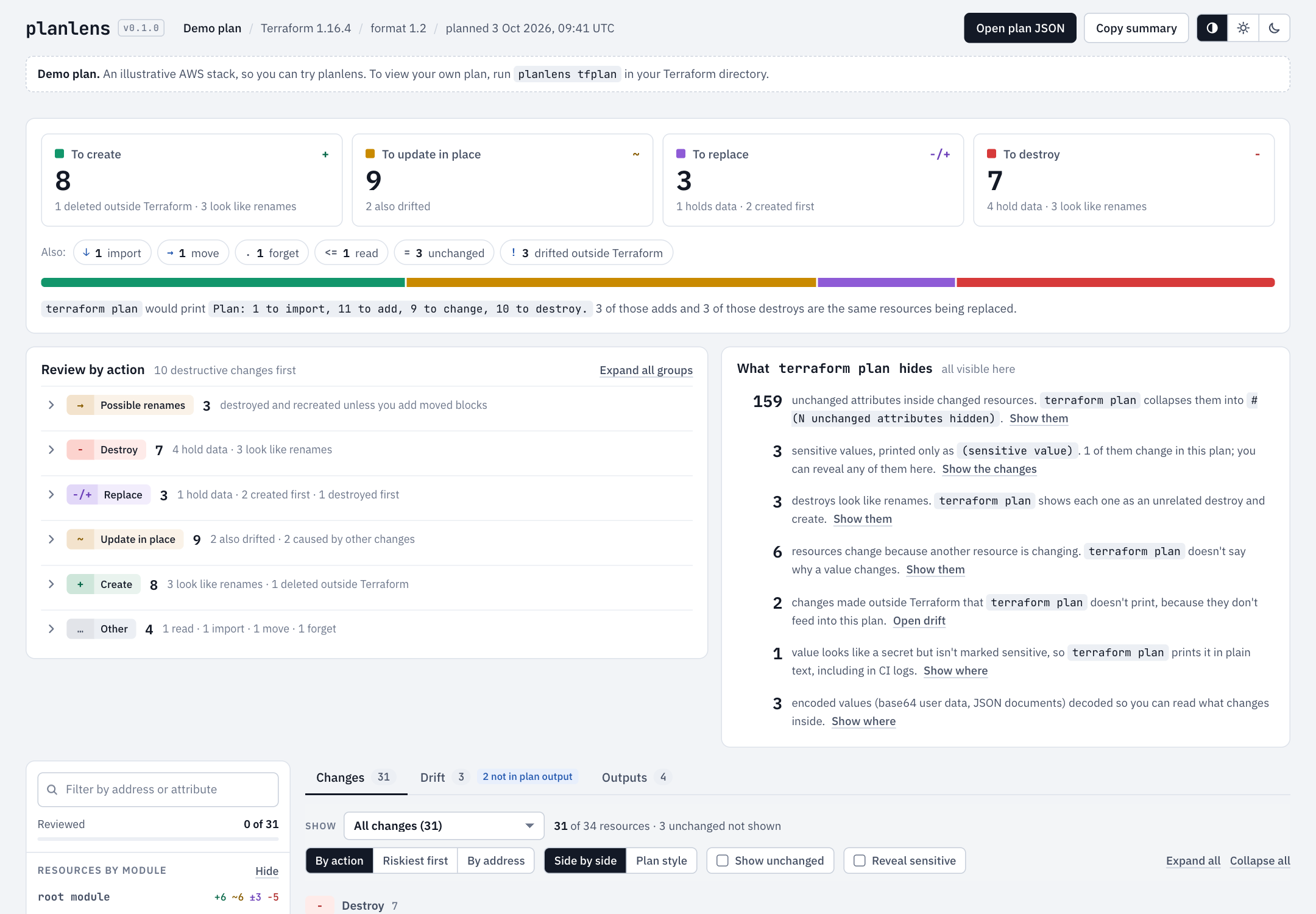
A good order:
- Read the summary. The four counts and the colored bar show how much is changing and how much of it is destructive.
- Open Review by action. Start with Possible renames, Destroy and Replace. Each item says why it's in the plan and warns about data loss.
- Check What terraform plan hides. Each line links to the resources it's about.
- Go through the list. Use the Show dropdown, or click a summary tile, to see one kind of change at a time. Mark each resource as reviewed; your progress is saved in the browser.
Keyboard shortcuts
| Key | Action |
|---|---|
/ | Filter by address or attribute name |
j / k | Next / previous resource |
o or Enter | Open or close the focused resource |
x | Mark the focused resource as reviewed |
u | Show or hide unchanged attributes |
Other ways to open a plan
sh
# Plan JSON you already have
terraform show -json tfplan > plan.json
planlens plan.json

# Pipe it in
terraform show -json tfplan | planlens -

# OpenTofu
tofu plan -out=tfplan
planlens --tofu tfplan

# Terraform runs in another directory
planlens --chdir infra/prod infra/prod/tfplan
You can also drag a plan JSON file onto an open planlens page, or use Open plan JSON.
On a remote machine
The viewer only accepts connections from the machine it runs on. To review a plan that lives on a server, forward a port over SSH, using the same port number on both ends:
sh
ssh -L 8080:127.0.0.1:8080 you@build-server
planlens --port 8080 --no-open tfplan    # on the server
Then open the printed address on your own machine. Or export a report and copy the file.